
Search the Community
Showing results for tags 'mk8 coding obdeleven'.
Found 1 result
-
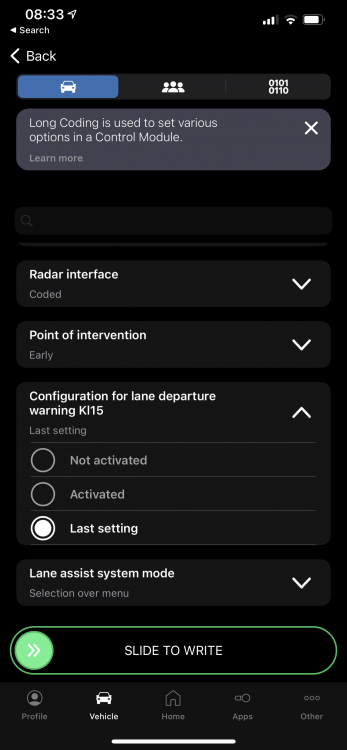
To start…. Lane Assist - remember last setting I’m happy to report that this tweak works and I now have Lane Assist set to remember it’s last setting which is deactivated as default on startup for me as I prefer to turn it off. I used OBDeleven Next Gen dongle but it should also work with the older first gen Android only dongle I believe. Here is the coding and process. - Start ignition and turn off Lane Assist using button end of indicator stalk. - Pop the bonnet handle to release the bonnet (you do not need to raise the bonnet fully). This is important otherwise the coding will not ‘write’ and you get a failed write message. - Plug in OBDeleven dongle into one port (located underneath drivers right side trim) - Turn ignition on (engine does not need to be running) - Launch OBDeleven on phone - Code as follows: - A5 Driver Assistance - Long coding - Configuration for lane departure warning Kl15 - Change from default ‘Activated’ to ‘Last Setting’ -Slide to write coding - Coding accepted and default is now set to ‘Last setting’ - A few ignition starts to test and Lane Assist is now deactivated by default at ignition startup. Very happy 8R owner! @dopper99 Success!



- 35 replies
-
- 12
-

-

-
- mk8 coding obdeleven
- mk8 r obdeleven coding
- (and 3 more)


