MuffinR
-
Posts
13 -
Joined
-
Last visited
Content Type
Profiles
Articles
Forums
Events
Store
Classifieds
Everything posted by MuffinR
-
I believe the no tap version is the newest device as Schmee150 said in his review it wasn’t on sale at the time but was coming soon. When I ordered my no tap version it wasn’t available on the website, I emailed them and they were happy to supply a no tap variant. I just checked the website again and noticed that they now have a drop-down on the order page to select the type that you want. Your experience reflects my suspicions of the two tap device, it’s clunky to use and clearly unreliable. I watched the usage video for the two tap and having to halt your gate for 0.5s and then continue before double tapping with 1s between taps just seems to ask for too much new behaviour from the end user.
-
UPDATE: If you hadn’t already guessed it, I can confirm that the keyless protector works by cutting the power to the key fob (from the design I think it isolates the negative terminal). Just washed the car, I left the keys on the side in the house out of range to stop the pressure washer from triggering the door lock sensor and when I was finished I pressed the lock button on the key fob (without picking it up) and nothing. I had to pick up the key fob to activate it again and then the buttons worked as expected. A minor inconvenience but if you often just tap the buttons on your fob without moving it then this probably isn’t for you.
-
Well the other half and I have spent quite a lot of time today trying to trick the keyless protector into locking out the car in the wrong situation and we haven’t been able to do it at all. The accelerometer on the device is extremely sensitive, the tiniest nudge resets the lockout counter on it. Normally the key lives in my pocket on a key ring but today I detached it and placed it in the little key holder below the auto hold button in the centre console. Under normal driving there is no problem, we drove for 20 minutes or so and then parked up with start-stop disabled, set the stop watch going on the wristwatch and timed away 3:30 (to be sure), absolutely nothing, the vibrations of the engine running keep the key alive. We considered that the sound system may also be a problem (I have dynaudio) because we could feel the vibrations from the speakers so we muted that and stopped the engine as well, still no “key missing” warning after 3:30 and the engine restarted on command. We did some shopping and tried again this time with start-stop enabled, when we next parked up start-stop kicked in and we started timing (radio muted), unfortunately we couldn’t reach 3 minutes at this point, the start-stop always restarted the engine after 1.5 - 2.0 minutes due to high power drain or cabin temperature. If I think about it I’m not sure I’ve ever had start-stop kick in for longer than 3 minutes, it’s always restarted due to power drain or the car in front moving off so maybe that’s why 3 minutes is the magic timeout number? Just to be sure when we got home I left the key on the roof of the car, locked with keyless and waiting 3:30, sure enough the protector had activated and the car wouldn’t open. I nudged, literally rocked the key fob in its case on the roof (don’t want to scratch the car!) a fraction and the key reactivated and the car opened. We also tried doing all of this with the key in my pocket and had no problems either, the key is so sensitive that even trying to sit still I think breathing keeps it alive! Certainly while driving the movement of foot from brake to accelerator will definitely keep it alive if momentum didn’t. The one test we haven’t done is to just sit in the car with the ignition off and see if it gets disabled. It’s hard to say whether or not the protector is actively communicating with the car, I would suggest not, it’s just very sensitive to movement. I’ve only had it 2 days so maybe over time I’ll discover some situations that can trick the unit but for now it is flawless.
-
So I’ve had the same thought, what if I’m stationary for 3 minutes, will it shut off? Well I can confirm that whilst travelling the motion of the car keeps it active but I will test it over the weekend by sitting still with the engine running and see what happens. You would think it would have some intelligence in it to spot an active exchange between fob and vehicle but we’ll see. I’ll report back with my findings.
-
I bought one of these and received it yesterday, it works perfectly, obviously it’s only been installed for 24 hours but so far no problems whatsoever. I got the non-tap version (the one schmee150 had in his Focus) that has an accelerometer that engages the lock after being stationary for 3 minutes and disengages as soon as the fob is moved. Officially that version isn’t on sale but I emailed them and they were happy to supply one for the same price. It wasn’t all plain sailing though, I didn’t bother to actually check my fob type before I ordered and just assumed a 7.5 R would be the latest (type 3). It isn’t it’s type 1 so if you order one, choose type 1 VW fob. Luckily it’s the same device and it’s just the padding that secures it into the fob that changes and you can peel the padding off the type 3 and turn it into a type 1. Phew!
-
Have to agree with @Sootchucker here, the software engineer in me says that this is just a means of smoothing the transition between two parameter profiles. I'd guess it takes the parameters of say the "normal" profile and when you select "race" it averages out the values between the two settings and then applies them over time (maybe 1-3 seconds). The curve just determines how aggressively that change is applied, sadly the VCDS site doesn't give much information on the function but there's also nothing to suggest that it is just the steering profile that it effects either.
-
Things you've only just discovered about your R
MuffinR replied to JonSW's topic in VW Golf R MK7 Chat
I just tried the keys in the boot thing on my October 17, 7.5R and I get the same result as @blower and others. Check spare key works first 😉, lock car, open boot via Kessy, drop keys in and shut the hatch. I got 4 solid flashes from the indicators (they didn't scroll like they normally would for lock/unlock) and that was it, I could open, remove the keys and close the hatch for the normal one flash scrolling indicator lock procedure. Whilst the keys were in there I also tried the driver and passenger doors and they steadfastly refused to open. 🙂 I believe US vehicles also chirp the horn if you leave your keys in there and if your models tailgate is powered it'll just re-open itself. -
I was suspicious that start/stop might have interfered with TJA, I disabled it but sadly didn’t stop for the rest of the journey. I seem to recall that the last time it worked start/stop didn’t engage. I’ll keep turning start/stop off and see what happens next time I have a traffic event. It should definitely continue without the need to press resume or tap the accelerator pedal unless of course blower is right and there is a cut off time for how long it waits before resuming. On the lane assist nagging about hands on the wheel though.... I’ve gone a LONG time just hovering my hands over the wheel to see what it will do if I don’t provide resistance and the worst is a bong and a message. It’s never juddered the brakes or turned the hazards on and pulled the car to a stop as the manual suggests but I’m not really willing to push it any further on public roads to find out. 😀
-
The VW promo video of TJA says that below 60 kph (37 mph) it keeps the distance automatically and "the traffic jam assist brakes automatically even down to a standstill and continues after a short stop". It doesn't suggest that the short stop has a time limit or that you have to press a button / tap a pedal to resume (that's regular ACC to me). That behaviour is also contrary to what I remember doing when I first got the car, it just took off on it's own but I can't say how long it was stopped for before it resumed. 🤨 I've got the latest VCDS build on my laptop so if it is possible to recode the stop delay then I can give it a go and increase it to 30 seconds or so and see what happens. I stop in traffic everyday, should be easy to test! 🙂
-
Hi folks, Maybe more specifically the subject should be "how do I use traffic jam assist?" I have 7.5 R in the UK, I paid the extortionate price for the advanced lighting, lane assist, blind spot monitoring, traffic jam assist etc. and I'm happy with them. When I first got the car a year ago I played with everything and I'm sure I had traffic jam assist (TJA) working on the motorway. The car would follow the vehicle in front, regulate speed as required and stay in lane, when we came to a halt it would resume automatically when the vehicle in front moved off (no input from me). I haven't used it since.... until yesterday. I got stuck in home time commute traffic and thought "perfect traffic jam assist scenario" but it didn't work! It just operated like normal ACC, every time the cars in front stopped the active info display showed "ACC is ready" and then start/stop kicked in and shut the engine off. I had to tap the accelerator pedal every time to resume the journey. What am I doing wrong? I had a quick Google, there's some stuff on the Ozzie Tiguan forum from a few years ago saying that you have to engage ACC whilst going over 42 mph (converted from kph) and have both sides of the lane locked with lane assist before TJA will work. Not had a chance to try that yet but the vehicle manual doesn't say anything about that. TIA.
-
@Charles M No, in my car when the fault is active the Performance Monitor will read the oil temp as zero but the Active Info display will show the correct oil temperature. If you hold the power button on the infotainment unit until it reboots that has always fixed the problem for a few days. I've also noticed how the unit I have (or software revision) doesn't always power off, it seems to go into standby. Some days when I start the car it is available instantly and other days I get the VW logo and a long wait for it to initialise (annoying because I have to wait for that before the reversing camera will display). @SIMK7.5 I hear you on the update worry, one fix may cause more problems but the update was issued for a reason (probably security) so I want the latest and greatest. On a side note , I used to have a Leon Cupra and dealership that serviced it always had "checked ETKA for updates" on the invoice but when I spoke to the master tech one time he said they never do them unless you ask. In short, if you're not complaining about it the they're not going to change it.
-
Anyone had windscreen replaced by Auto-glass?
MuffinR replied to Fyfey96's topic in VW Golf R MK7 Chat
Just to add to this, my 7.5 R also suffered a cracked windscreen around 6 weeks old during the UK November snow last year and I had mine replaced by AutoGlass. I asked AG for an OEM / VW branded windscreen because they were going for one of the third party ones with a sun strip on it (yuk!) and they just contacted my insurance and shortly later it was approved. I had to wait longer to get the replacement and I also had to go to a fitting centre because I have ADAS (lane tracking, light assist etc) which sadly wasn't nearby but they did a great job. I was worried about rattling and squeaking on the way home but 24 hours later it had all gone so I guess it was the glues curing. -
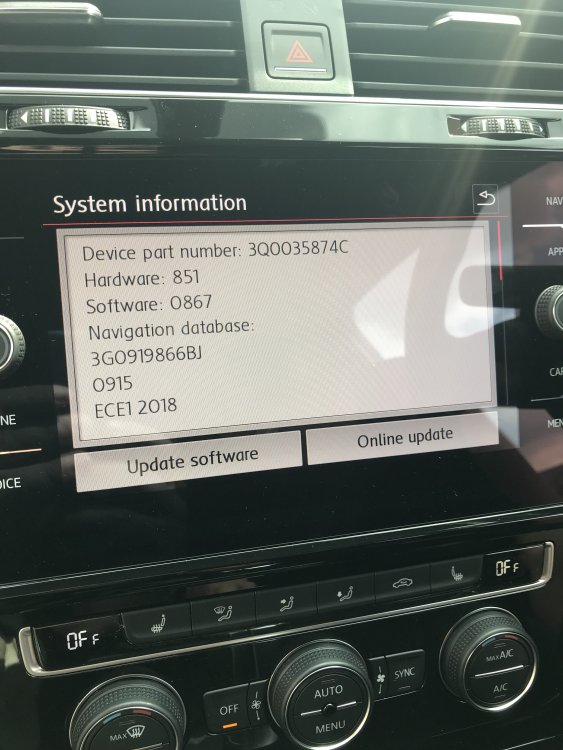
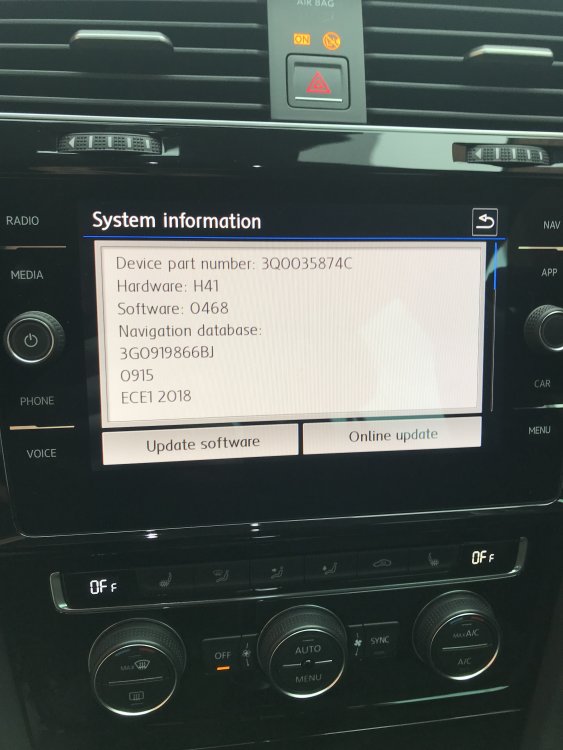
YES! I've got this exact problem. Hello everyone, long time lurker, first time poster. My 7.5 R has done this since new (Sept 2017), oil temp on infotainment will register zero sometimes whilst the dash says 90 (or whatever). It is not consistent and for the most part works as normal and as it has already been noted it will often just rearrange the dials on the infotainment display randomly between restarts. I took the car back to VW (an Inchcape dealer that is certainly one of the worst in the UK) when the car was 6 weeks old to complain. They checked the software "reset" it and said there were no updates. Since then we've also bought a new 2018 GTI PP 7.5 with the same infotainment unit, this unit has much newer firmware than my R and has so far not had this problem (it is also much, much more responsive to use and faster to startup). I want VW to update the firmware to the latest, clearly there is one but I missed the opportunity at it's service a few weeks ago and now I don't want to take it in and be charged labour for them to say "no updates sir". I'd be interested in knowing what firmware other people have? Mine is the 8" Discover Media (not the larger Pro version, so is our GTI PP). Both units are 3Q0035874C but mine is hardware H41 with software 0468. The GTI PP is hardware 851 with software 0867. I know there is hardware difference there but I'm putting it down to I have Dynaudio and the GTI doesn't rather than a processor upgrade on the unit. I'd be interested to know other peoples experience with different firmware versions and success in getting VW to update it. I've looked everywhere for a way to do it myself, so far no luck.