


SteveB70
-
Posts
25 -
Joined
-
Last visited
SteveB70's Achievements

Member (2/9)
11
Reputation
-
 rickygolf83 reacted to a post in a topic:
5.8" Screen MIB1 to 8" Screen MIB2 Retrofit.
-
slider09 reacted to a post in a topic:
5.8" Screen MIB1 to 8" Screen MIB2 Retrofit.
-
5.8" Screen MIB1 to 8" Screen MIB2 Retrofit.
SteveB70 replied to SteveB70's topic in Guides and How To's
Great thank you. Steve. -
SteveB70 reacted to a post in a topic:
5.8" Screen MIB1 to 8" Screen MIB2 Retrofit.
-
 Msportman reacted to a post in a topic:
Which MIB Do I Have ? Can I Upgrade It?
-
Which MIB Do I Have ? Can I Upgrade It?
SteveB70 replied to SteveB70's topic in Modifying your Golf R MK7
I think having the Dynaudio system makes things a little different, sure I read somewhere you need a new amp, but I could be wrong. I'm sure Alex @Retrofit could help you. -
5.8" Screen MIB1 to 8" Screen MIB2 Retrofit.
SteveB70 replied to SteveB70's topic in Guides and How To's
The 2 that are right at the bottom of my post, picture of the tools & the glove box clip. -
5.8" Screen MIB1 to 8" Screen MIB2 Retrofit.
SteveB70 replied to SteveB70's topic in Guides and How To's
Thanks, any idea how I can edit the post? Unsure why those 2 photos have appeared under my name !! -
5.8" Screen MIB1 to 8" Screen MIB2 Retrofit.
SteveB70 replied to SteveB70's topic in Guides and How To's
Depends on the type and size of screen you go for but anything from £650.00 upwards from a retailer or less if you source the parts from ebay and code them yourself. -
dj219957 reacted to a post in a topic:
5.8" Screen MIB1 to 8" Screen MIB2 Retrofit.
-
Booth11 reacted to a post in a topic:
5.8" Screen MIB1 to 8" Screen MIB2 Retrofit.
-
Booth11 reacted to a post in a topic:
Which MIB Do I Have ? Can I Upgrade It?
-
Which MIB Do I Have ? Can I Upgrade It?
SteveB70 replied to SteveB70's topic in Modifying your Golf R MK7
How To Guide now in the 'Guides & How To' Section -
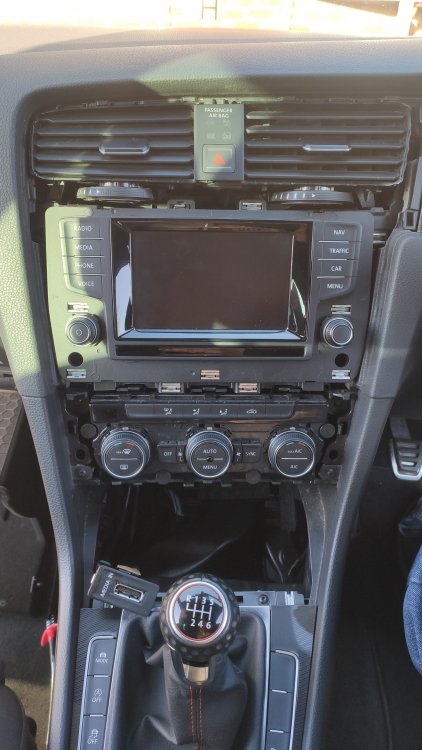
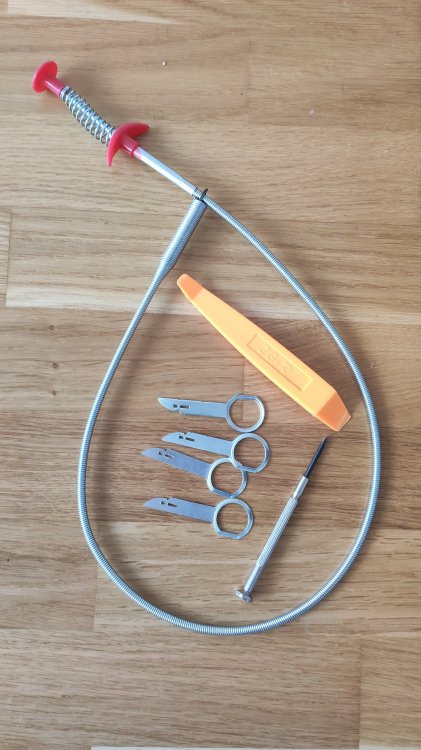
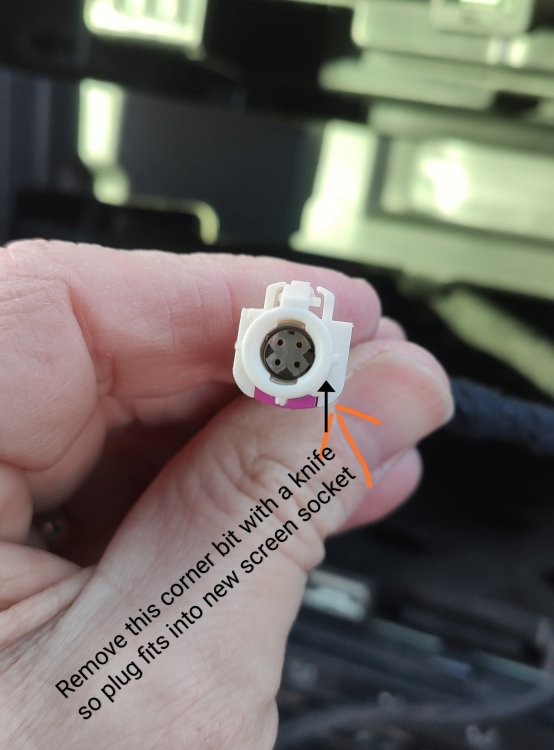
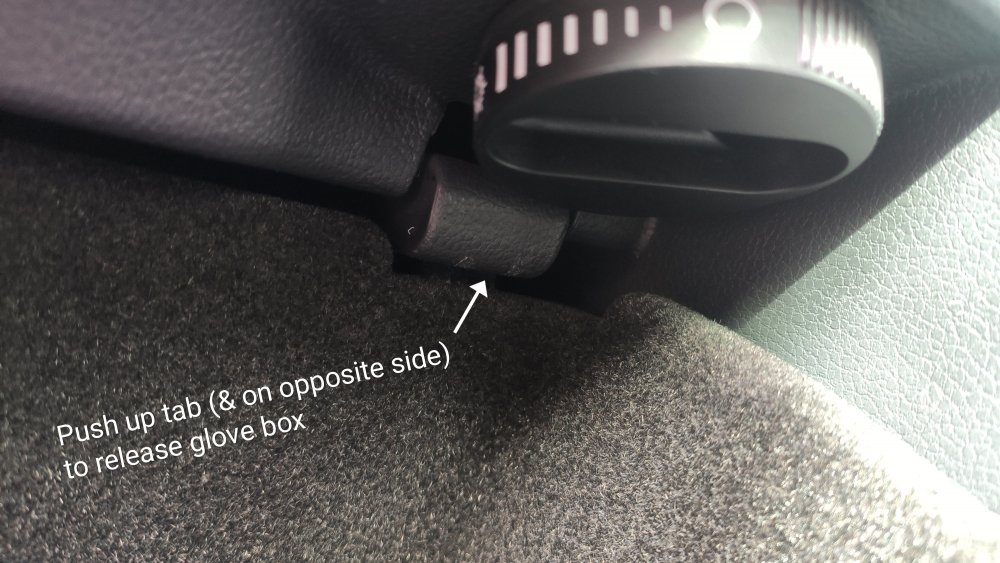
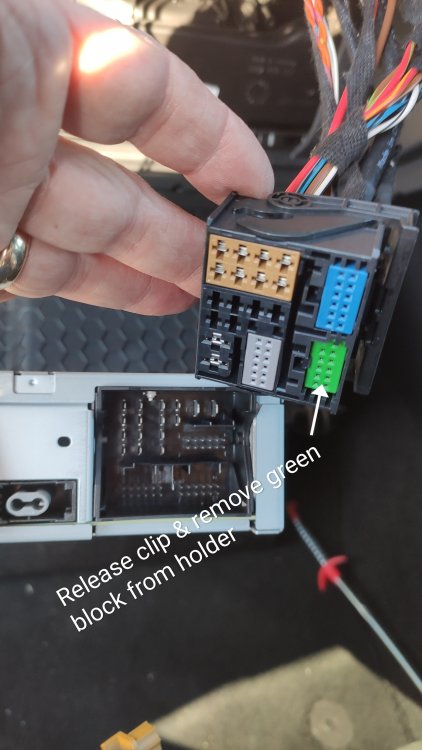
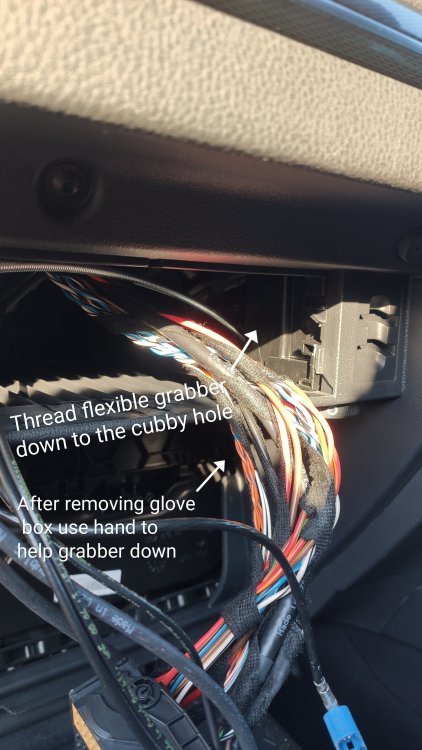
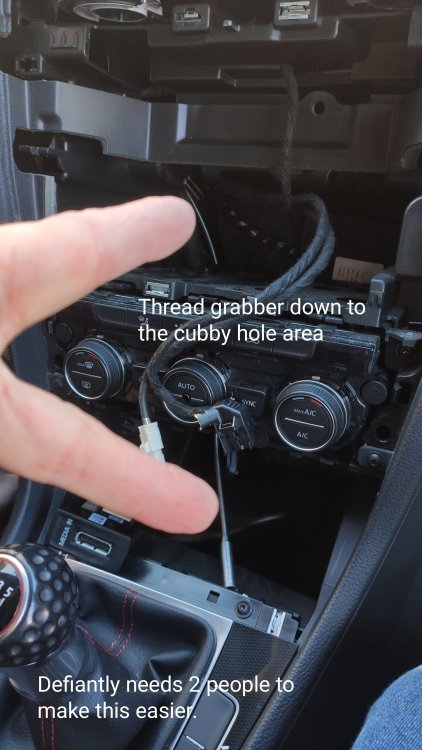
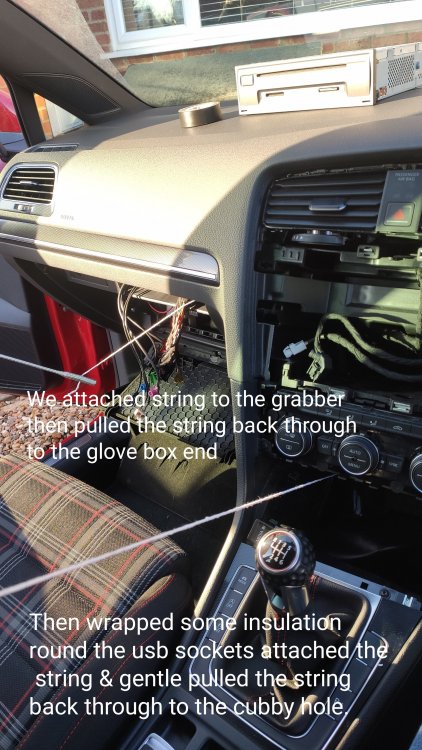
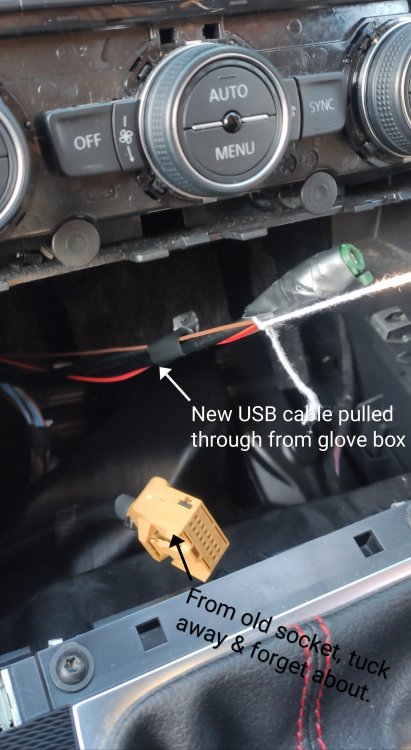
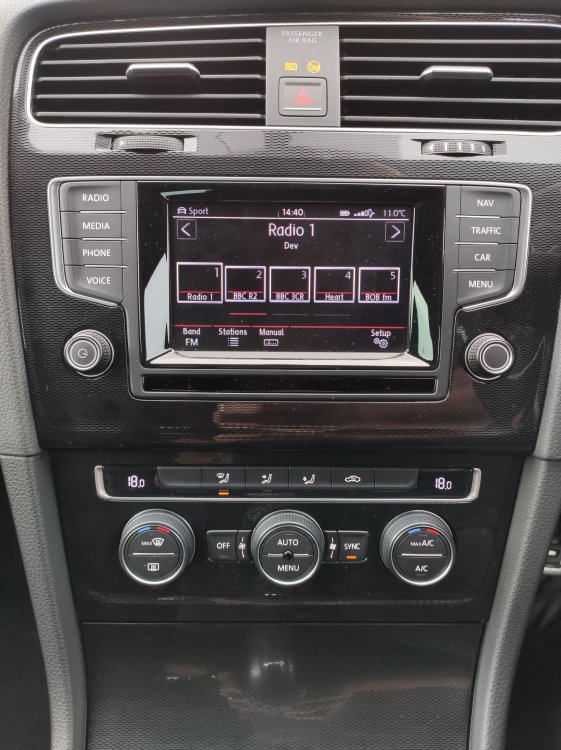
I recently retrofitted an 8" LCD screen, MIB2 glovebox unit & USB socket & harness to my MK7 GTI (which would be the same for the MK7 R). I took a few photos during the fit and thought I'd share them & how I did it on here. I started this thread a few months ago and decided to have a go at the retrofit myself (with my daughter who's hands are smaller than mine) after all the useful info/videos that were shared on the thread and the current lockdown travel restrictions stopping me driving to Leicester to have Neethan install it for me. The 5.8" screen in place before we started. I bought the main items from VAGCoding Leicester and received alot of helpful advice from Neethan by email/phone. I also used a flexible grabber, plastic pry tool, radio removal keys & a small flat head screwdriver all bought from ebay or Amazon. First disconnect the battery. Then I removed the cubby hole by gently prying it out with the plastic pry tool Then remove the old socket from the cubby hole and then we took the old trim off the air con dials and the screen. The vents stayed in place so I left them there. Next, using the 4 radio removal keys, we took out the old 5.8" screen (no photo of this) Then un-plug the 2 plugs from the back of the old screen. To get the smaller white plug to fit in the new screen you need to shave off one of the 'fins' on it We then moved onto the glove box and the main unit. We opened up the glove box to gain more access to the back of the dash. Using 2 of the radio removal keys pull out the mib1 unit and unplug all the cables. From the larger black block of wires remove the green block as this is replaced by the new green block on the new USB harness. Also replace the yellow plug (on the MIB2 unit) with the new yellow one from the USB harness. We then tried to get the new USB cables/harness from the glovebox area through the dash to the cubby hole. This was the toughest part but with the 2 of us only took about 10 mins. We then plugged all cables into the new USB socket, plugged the USB socket into the cubby hole. Plugged all the cables back into the new MIB2 unit and re connected the battery just to check everything worked. Had a few errors but these self cleared after the first drive. Then slowly pushed the MIB2 unit back into the glove box. and tided up . To get the new trim back on the screen and vents I found it alot easier to pull the vents out an inch or so (to save removing the air bag warning light/hazzard switch) then gently clipping the 12 or so clips around the air vents and then slowly pushing the trim over the screen. If you remove the vents at the start with the old trim then put the vents on the new trim BEFORE you try to push the trim over the screen (hope this makes sense) That's about it I think. Took us about an hour in total with no swearing or grazzed knuckles 😄 Overall I was very surprised at how well the install went. I will try and answer any questions about this if you have any. Steve.






-
Which MIB Do I Have ? Can I Upgrade It?
SteveB70 replied to SteveB70's topic in Modifying your Golf R MK7
Wise choice, the glass screen are a fingerprint magnet. Hope to get the photos on tomorrow or Monday. -
Which MIB Do I Have ? Can I Upgrade It?
SteveB70 replied to SteveB70's topic in Modifying your Golf R MK7
Although if you've got a Golf R then the trim is, I believe, gloss black so you can get new trims for the 8" glass LED screen and even the 9.2 " screen from ebay in gloss black. -
slider09 reacted to a post in a topic:
Which MIB Do I Have ? Can I Upgrade It?
-
Which MIB Do I Have ? Can I Upgrade It?
SteveB70 replied to SteveB70's topic in Modifying your Golf R MK7
Yes, I will do that with the pictures I have (not for every stage though). I'll post back here when I've done it. Steve. -
slider09 reacted to a post in a topic:
Which MIB Do I Have ? Can I Upgrade It?
-
NRW reacted to a post in a topic:
Which MIB Do I Have ? Can I Upgrade It?
-
marshy reacted to a post in a topic:
Which MIB Do I Have ? Can I Upgrade It?
-
Which MIB Do I Have ? Can I Upgrade It?
SteveB70 replied to SteveB70's topic in Modifying your Golf R MK7
Hi everyone, as the thread starter I thought I'd update this with what I decided to do. Originally I was going to drive from Kent to Leicester to get Neethan from VAGCoding to retrofit my GTI with an 8" non glass LCD screen, MIB2 unit & USB connector & harness as I though it'd be too complicated to do myself. I went for the non glass 8" screen as I wanted to keep the carbon fibre surround which isn't available with the glass LED screens. After getting fed up with the lockdown travel restrictions and seeing the videos and info posted on this thread I thought I'd have a go myself. I contacted Neethan and purchased the 8" LCD screen retrofit kit and he posted it all to me. I then ordered the 8" Carbon fibre effect surround trim from my local VW dealer, some radio removal keys from Amazon and a flexible grabber (made the job so much easier) from Ebay. The whole process of installation took myself & my daughter (who's hands are smaller than mine) about 1 hour to do. I took some photos during the fit which I can post if anyone is interested. Thank you for everyones help it made this whole retrofit alot easier than I thought it would be. The finished screen and trim.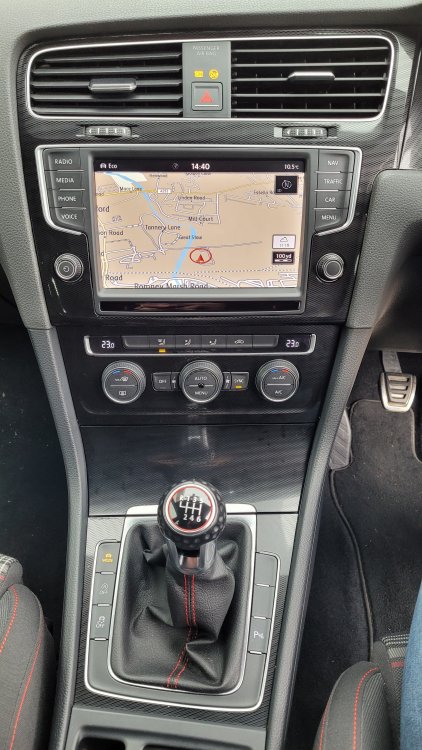
-
Which MIB Do I Have ? Can I Upgrade It?
SteveB70 replied to SteveB70's topic in Modifying your Golf R MK7
Thanks all for the info, think I might try a few more VW dealers and see if any can find it. Thanks Again. Steve. -
Which MIB Do I Have ? Can I Upgrade It?
SteveB70 replied to SteveB70's topic in Modifying your Golf R MK7
Hi, I've put my MIB2 & 8" screen retrofit on hold due to the current lockdown travel restrictions but have still been trying to track down a carbon fibre finish 8" screen trim. Can I just confirm that the part number above was for the carbon fibre finish for the 8" screen? As I've called 2 local VW dealer parts depts and they both said it not available in carbon finish only grey, dark rhodium and gloss black. I seem to be going round in circles with this. Thanks for your time. -
Which MIB Do I Have ? Can I Upgrade It?
SteveB70 replied to SteveB70's topic in Modifying your Golf R MK7
Excellent just what I need, was going to phone my local VW dealer today. Can I ask what area you're in and who did the upgrade? Steve. -
Which MIB Do I Have ? Can I Upgrade It?
SteveB70 replied to SteveB70's topic in Modifying your Golf R MK7
Not looking promising. Alex came back to me saying the units he supplies (8" LCD or 8" glass LED ones) come with a gloss black surround. This is frustrating as it'll stand out against the rest of the carbon effect dash. The hunt for a 8" carbon one continues.


